Motion Analytics
Understand how motions are decided before you file one, and see the full arc of any case on a visual Timeline.
Winning a motion is not just about citing the right cases. It depends on how this judge has ruled before, what arguments have worked in this court, and whether the timing of your filing matters. Motion Analytics gives you data-driven answers to all of those questions before you commit to a strategy.
Motion Analytics goes beyond general litigation data to focus specifically on how courts rule on motions. Whether you are preparing a motion to dismiss, drafting a summary judgment brief, or responding to a discovery motion, you can see exactly how similar motions have played out in the same venue with the same judge.
The Motion Analytics report: grant and denial rates, average time to decision, and outcome trends, broken down by court, judge, party, case type, and law firm.
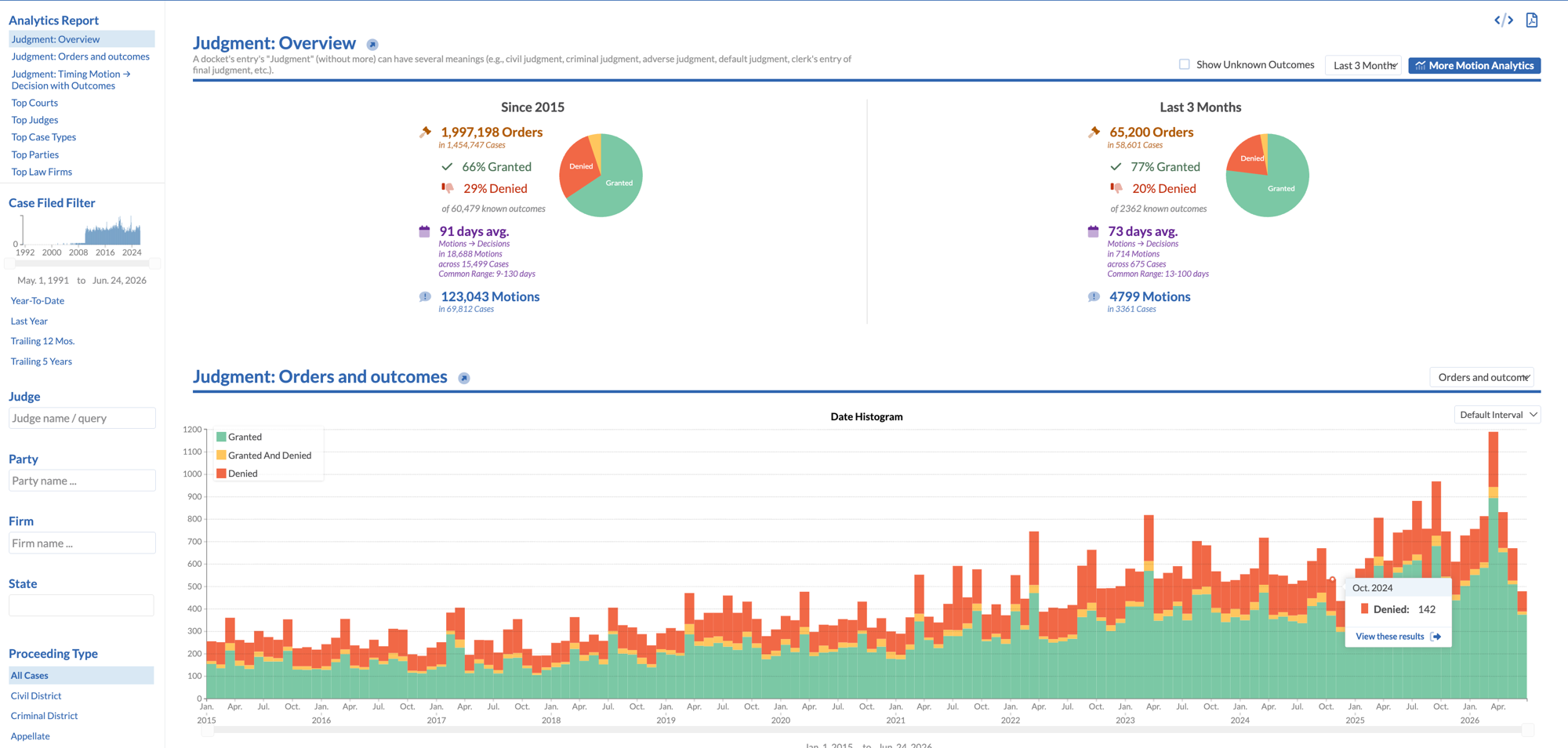
What Motion Analytics Covers
Motion Analytics covers the full range of contested motions across all federal courts and select state courts.
Motions to Dismiss
Grant rates by court and judge, broken down by case type and grounds asserted. See which pleading theories survive and which consistently fail in your jurisdiction.
Summary Judgment
Full and partial summary judgment outcomes by case category, subject matter, and judge. Understand how courts handle disputed fact questions in your area of law.
Discovery Motions
Outcomes on motions to compel, protective orders, and sanctions. Find out which objections courts sustain and how judges approach proportionality disputes.
Preliminary Injunctions
Grant rates for TROs and preliminary injunctions by case type and circuit. See how courts weigh the four-factor test and which factors prove decisive in your circuit.
Key Insights
Motion Analytics surfaces specific, actionable data at every stage of motion practice.
Know the odds before you file
See historical grant rates for any motion type, filtered by judge, court, and case category. Understand whether you are filing in a favorable forum before you commit to a strategy.
Find what actually works
Identify the argument structures and legal standards that appear most frequently in successful motions in your venue. Surface the language and framing that courts in your circuit have found persuasive.
Understand procedural rhythm
Learn how long courts take to rule on different motion types, when in a case lifecycle motions are most likely to succeed, and how scheduling orders shape motion practice in each district.
See how judges apply the law
Track how a specific judge has applied legal standards over time. Understand whether their approach to Twombly pleading, summary judgment materiality, or Daubert gatekeeping has shifted.
Benchmark against top firms
Compare your motion strategy against how the highest-performing firms approach the same motion types in the same courts. See where your outcomes diverge and learn from the difference.
Track how judges evolve
A judge's approach to motions can shift over years on the bench. Motion Analytics lets you analyze how a judge's rulings have changed over time so your strategy reflects current patterns, not stale assumptions.
How Litigators Use It
Motion Analytics fits into the three moments where data matters most in motion practice.
Before Filing
Run the analytics before you draft. Know the grant rate for your motion type in front of this judge. Confirm that the forum supports the legal theory you plan to advance. Decide whether to file at all based on real historical outcomes rather than instinct.
Before Responding
When opposing counsel files a motion, understand immediately how courts in this district have treated similar motions. Identify which counterarguments have prevailed and frame your opposition around what this judge has found persuasive in prior rulings.
Before Oral Argument
Prepare for the bench with a clear picture of how this judge has questioned parties on this type of motion before. Know which issues they press hardest and where they have signaled skepticism in prior cases.
Find Example Motions
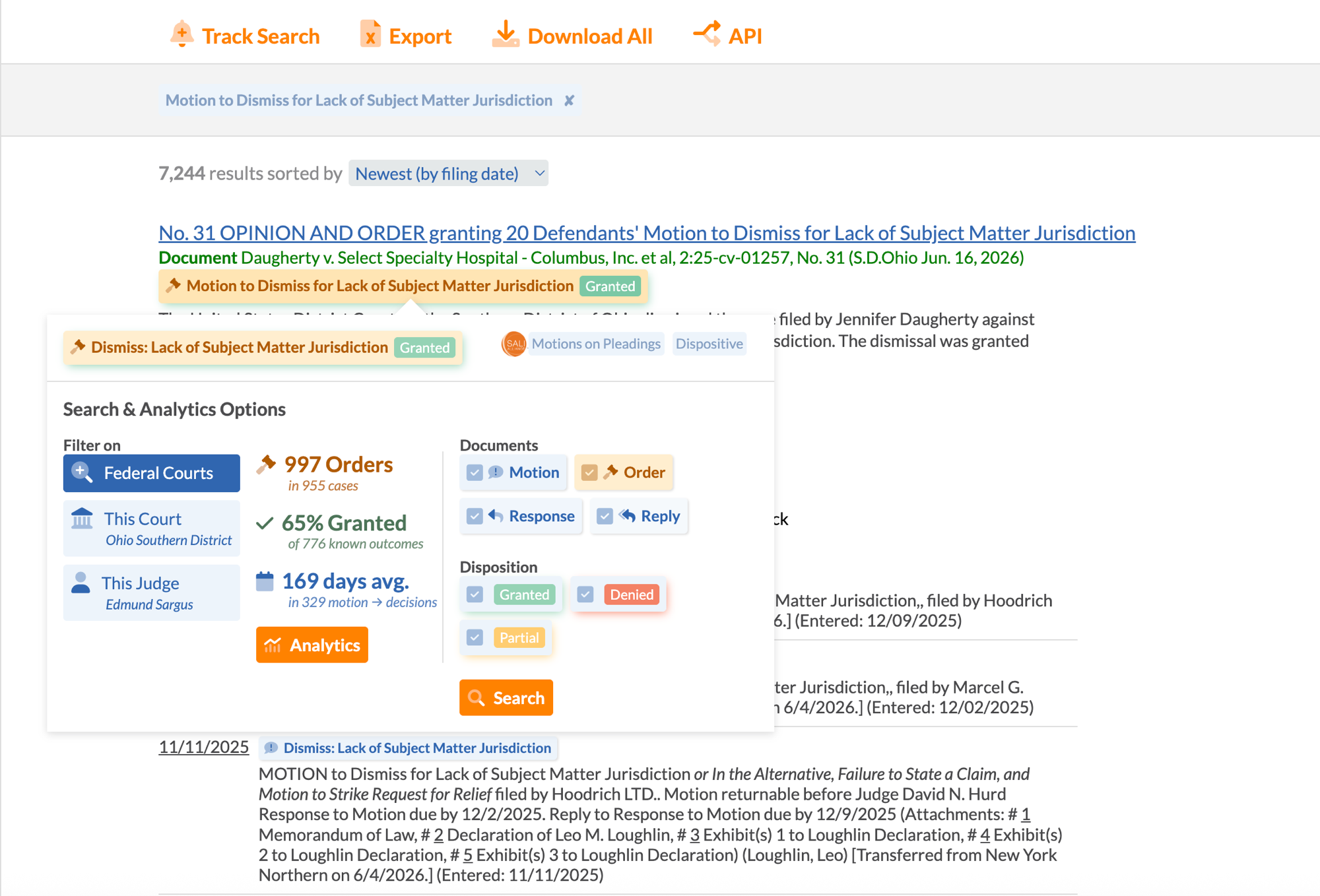
Motion Analytics is also the fastest way to find real, on-point motions to model your own on. Search for example motions by motion type and case type, or narrow to motions filed before a specific judge or by a particular opposing counsel. See how successful motions were actually written, structured, and argued before you draft.
Search for example motions by type, court, judge, or party, and open the analytics on any result.
See the Whole Case as a Visual Timeline
Every docket tells a story. Timeline makes that story visible.
Motion practice never happens in isolation. Docket Alarm's Timeline converts raw docket entries into an interactive visual chronology, so you can see exactly when a motion was filed, how long the court took to rule, and where it sits in the full arc of the case. Timeline is generated automatically for every case in the database, with no setup and no manual tagging.
The interactive Timeline view: every filing, motion, order, and deadline plotted in chronological context, color-coded and filterable.
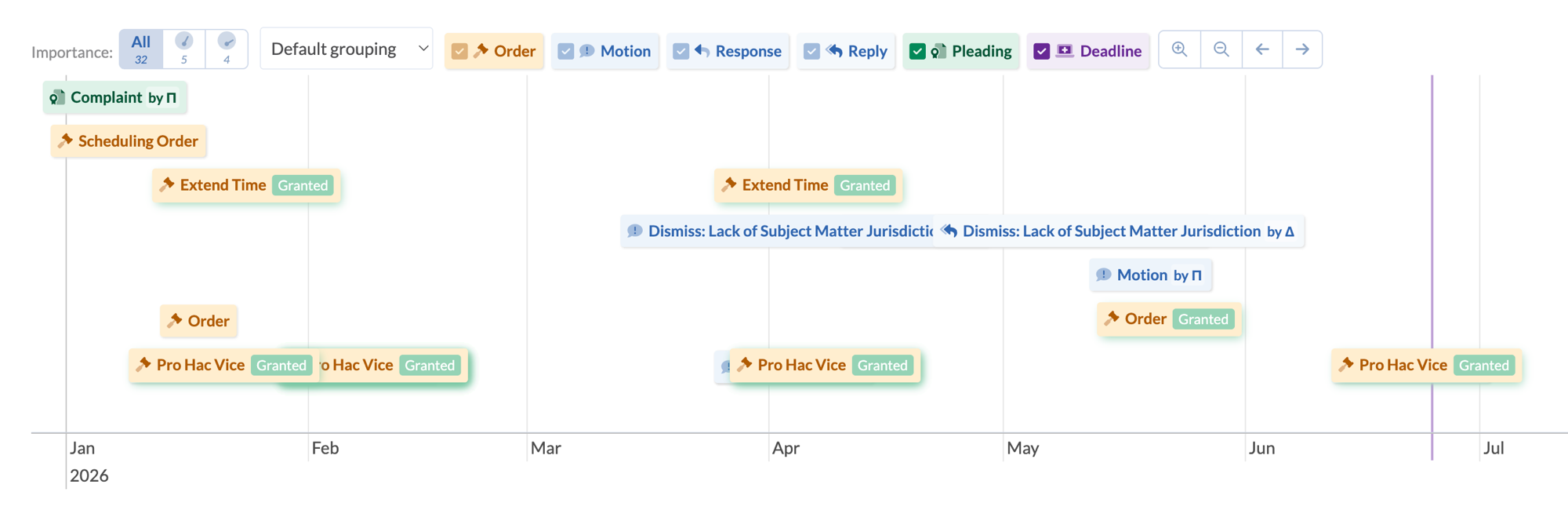
The exact date the case was filed, anchoring the full chronology.
Motions to dismiss, summary judgment, and discovery motions, each placed at the date filed.
Every court order and ruling, visible at a glance so you can see how the case evolved.
Scheduled filing deadlines and case-management dates shown in context.
Patterns become visible
Gaps between filings, bursts of activity before trial, and long stretches of inaction are immediately apparent when the docket is laid out visually. You see what you would miss in a list.
Delays are impossible to hide
A court that took eighteen months to rule on a pending motion shows that delay clearly on the timeline. You do not need to calculate it yourself.
Momentum reads instantly
Densely packed events mean the case is moving fast; a stretched-out timeline means something stalled. Understanding case velocity takes seconds, not minutes of reading.
Improve Your Motion Strategy
Stop relying on intuition when data is available. See how courts in your venue actually rule, and make better decisions before you file.